















































Earn Points for Comments
After successfully placing an order, customers can submit reviews and comments. Once a comment is accepted, points will be earned; the more comments, the more points.

Successfully placed alone

Reviews and comments

Once adopted

Earn points
* Only one review is allowed per product; duplicate reviews are not permitted.
*Please note that the membership and points programs on the website and in-store are not interchangeable.
*In case of any dispute, Gogo Herbs (Take Care HK Limited) reserves the right of final decision.
Product review steps
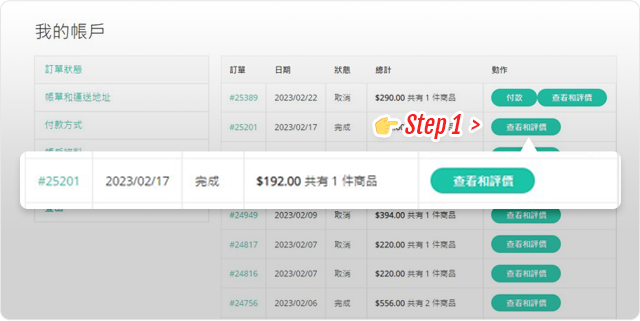
Step 1
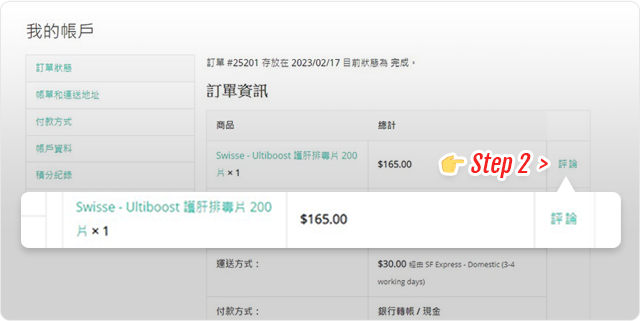
1. After logging in, click " My Account Check order status
2. Click on the "..." in the order list View and rate 」
Step Two
1. In " Order Information Find "" on the right side of the page Comment 」
2. Click " Comment "Conduct product evaluation"
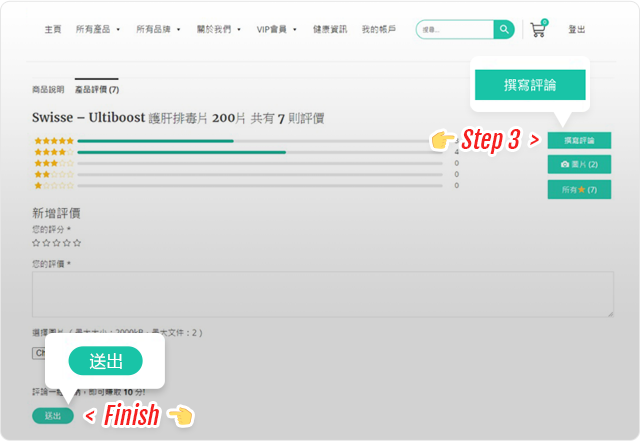
Step 3
1. Click the " " on the right Write a comment Start product review
2. After adding a review, click the bottom left corner. Send 」
3. Complete the evaluation! Earn points!
Google Comment Steps
Step 1
1. Log in to your Google account
2. Search for "" in the search box gogoherbs 」
Step Two
1. In " Search page Find "" on the right side of the page Comment 」
2. Click " Write a comment "Evaluate"
Step 3
1. Click " Five stars Rate and leave a positive review
2. After adding a review, click the bottom right corner. release 」
3. Send us a screenshot via WhatsApp. Once verified, you will receive [the reward/reward]. $10 discount code 」
✅ Steps to comment on Facebook
Step 1
1. Open Facebook
2. Search for " Gogo herbs FB "Special Page"
Step Two
1. Click " about "turn up" Comment 」
2. Click " View all 」
Step 3
1. The page will display " Do you recommend Gogo Herbs HK, a specialty store for imported health supplements? ",according to" 是 Then you can comment and upload pictures.
2. Send us a screenshot via WhatsApp. Once verified, you will receive [the reward/reward]. $10 discount code 」